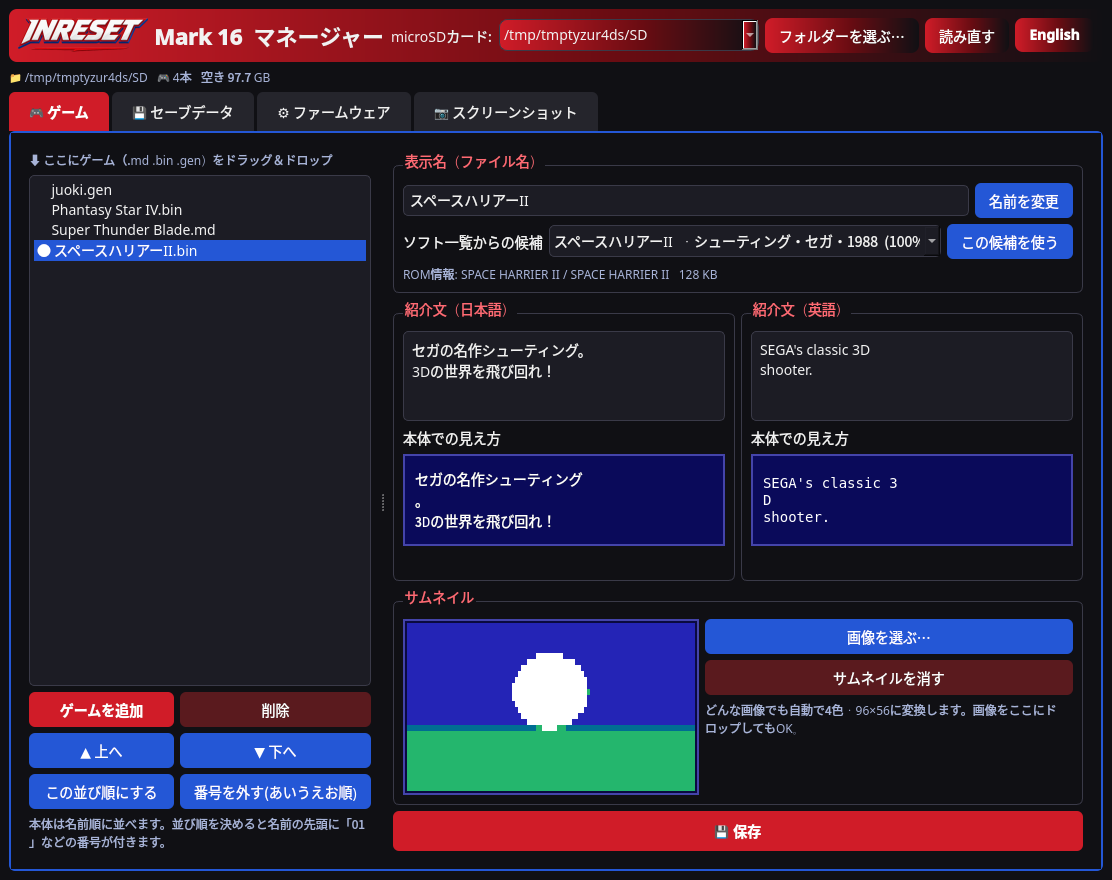
We updated the Mark16Manager beta to v0.2.1. Builds are available for Windows and Mac (Apple silicon and Intel).
A new Delete tab lets you pick firmware (UPDATE folder), screenshots, and save data (including save states) on the SD card and remove them. A confirmation dialog appears first, and selected files are moved to the computer’s Trash. Game ROMs and intro files (INFO) are never deleted.
Screenshots can now be saved to the computer as a selection (multi-select is allowed). A Save all button is still available. List thumbnails are larger, and a preview shows the selected image, scaled with nearest neighbour so pixels stay sharp.
A new MDTANG folder is never created. All creates and writes go under /MARK16. If a card already has only MDTANG, the app can still read it, and the first write moves that folder to /MARK16.
It is an unsigned beta for Mark 16 development units.
We have been continuing to improve the prototype console.
We fixed a bug that made the music in Hellfire play too slowly. The cause was the way the sound chip’s (YM2612) BUSY flag was handled, which did not match a real Mega Drive. We have confirmed the fix on hardware.
The second controller port now works too.
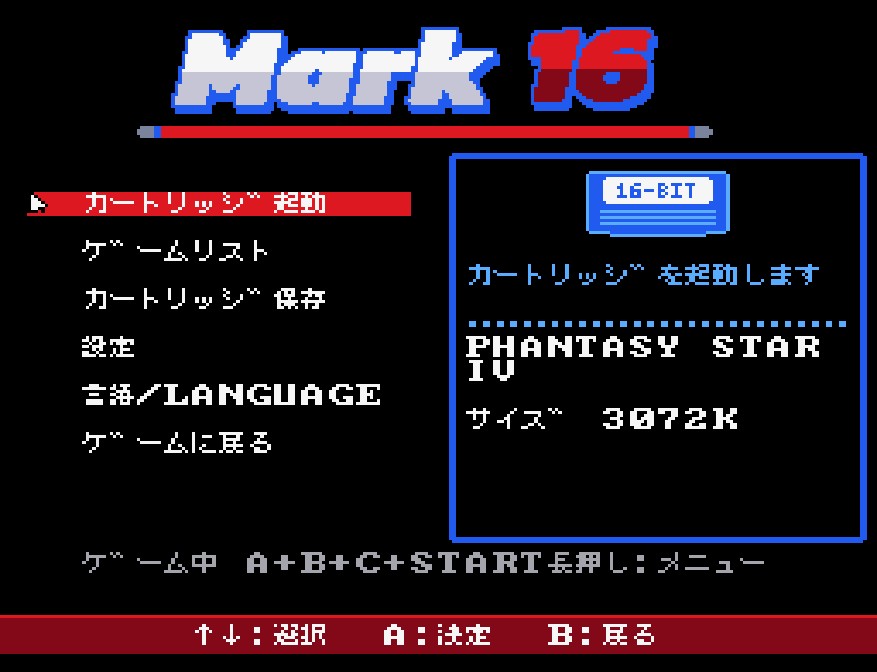
The menu has also been redesigned. It uses the “Game list” label, a blue box around the selected item, and keeps the illustration. Firmware updates are applied from Settings → Console update. Games can be deleted, with a confirmation step. Message text that was turning blue on the right-hand side now stays in the white area.
Save states (storing your progress in slots) and taking screenshots on the console are now available. When you save a screenshot to a computer, it is enlarged to 4× while keeping sharp pixels. Save states still have problems in some software.
For Forgotten Worlds, where the player ship could vanish for a moment, we have an FPGA build with sprite-display fixes that is now being tested on hardware.
The Mark16Manager beta is now at v0.1.9, with builds for Windows and Mac (Intel). This release does not include a separate Apple silicon build. You can add games to a microSD card, edit thumbnails, intros, maker and release date, back up saves and save states, and export screenshots. It is an unsigned beta for Mark 16 development units.
We updated the Mark16Manager beta to v0.1.5. Builds are available for Windows and Mac (Apple silicon and Intel).
You can now set a title and a short intro for each game, in Japanese and English, with a live preview of how they look on the console. 132 well-known games come with original intros and official titles, filled into empty fields when you add a ROM. A “Fill empty from built-in data” button does the same for games already on the card. Text you wrote is never overwritten.
It works with older firmware (older consoles ignore the titles and show the file name). Titles show on the console from Pico firmware v41d2 or later.
We updated the Mark16Manager beta to v0.1.4. Builds are available for Windows and Mac (Apple silicon and Intel).
Firmware files (Pico .uf2/.bin and FPGA .fs) are now saved to /Mark16/UPDATE/ under their original names, which is the folder the console (v41+) reads. After writing, the app checks that the file exists and that its size and contents match, and shows the saved location.
SMS cores (.m16f) go to /Mark16/FPGA/. A leftover /Mark16/FPGA/mark16_pico.uf2 from v0.1.3 is unused by the console and can be deleted.
We updated the Mark16Manager beta to v0.1.3. Builds are available for Windows and Mac (Apple silicon and Intel).
Supports ROMs up to 8MB (such as Super Street Fighter II). This needs Mark 16 firmware v41. Older firmware still refuses files over 4MB.
Automatic thumbnail fetch from libretro-thumbnails, saved on your computer only. On by default, and can be turned off. Picture rights belong to their owners; personal use only.
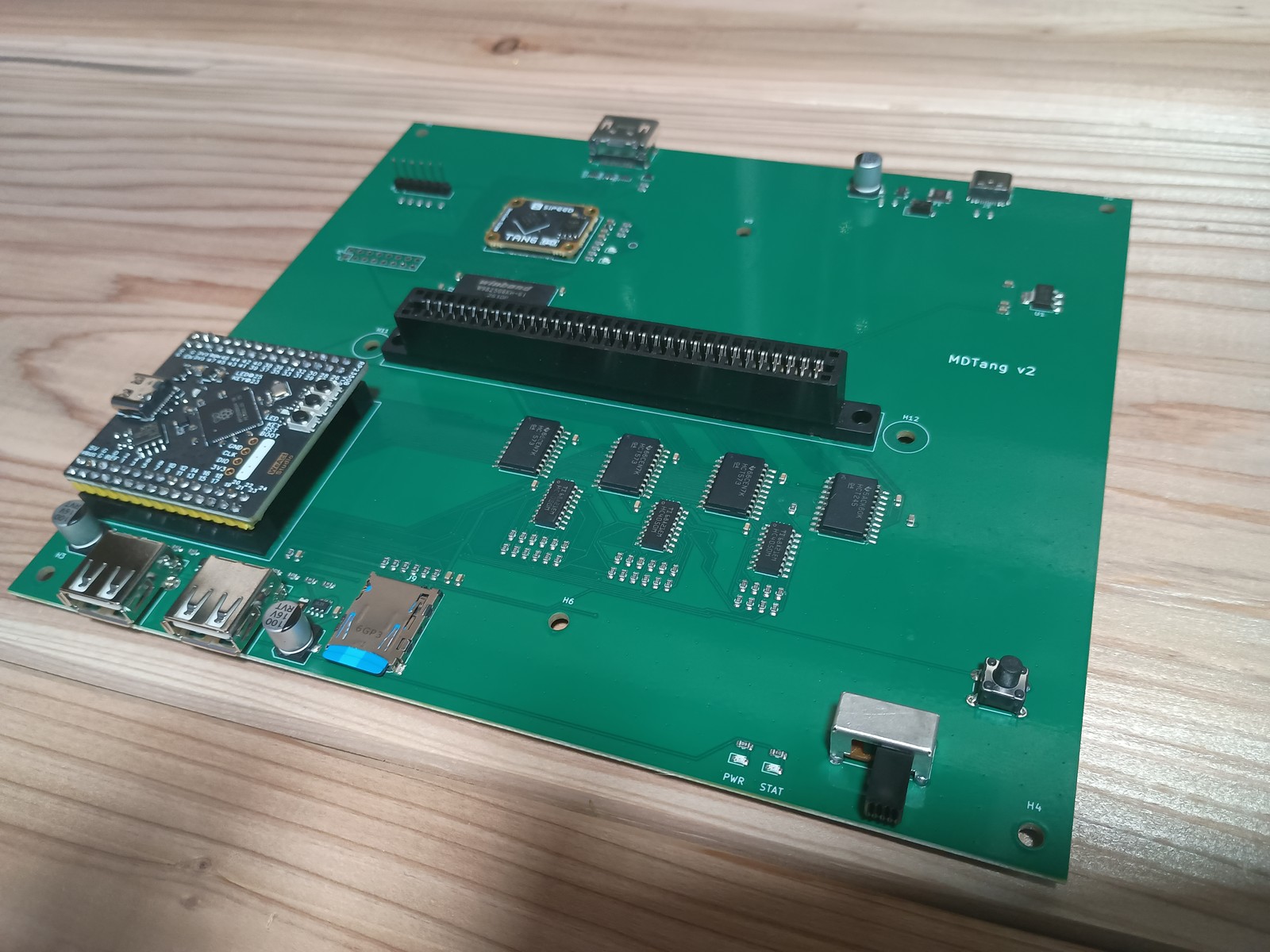
The JLCPCB-made Mark 16 main board (v2, silkscreen “MDTang v2”) has arrived. We mounted the Tang Primer 25K, WeAct RP2350B Pico, cartridge slot, microSD, and USB-A ports, and assembled it.
On first power-on, the SD menu ran, and games could be started from the SD card.
We found a problem with the cartridge-slot pin-row orientation. A fixed v2.1 board, with the slot rows swapped and the microSD moved slightly, has already been ordered.
Testing and improvements, including save states, are still under way.
Mark 16 main board (v2, assembled)
Mark16Manager updated to v0.1.2
We updated the Mark16Manager beta to v0.1.2. Builds are available for Windows and Mac (Apple silicon and Intel).
The SD card root folder is now Mark16. Cards that still use the old MDTANG folder keep working (Mark16 is preferred if both exist). New folders are always created as Mark16.
We updated the Mark16Manager beta to v0.1.1. Builds are available for Windows and Mac (Apple silicon and Intel).
Thumbnails are now 16-colour, using the Mega Drive’s 512-colour palette (previously four colours), with a preview closer to the console display. Older four-colour thumbnails can still be read.
Japanese intro text now follows the console’s oidashi line-break rules, and combining dakuten is counted as one character, matching the console. The app also notes that cartridge boot is RAM-copy only, and that cartridge saves are stored under /MDTANG/SAVES/.
We released the beta (v0.1.0) of Mark16Manager, a companion app for organising a Mark 16 microSD card on your computer. Builds are available for Windows and Mac (Apple silicon and Intel).
Connect the card with a reader to add and reorder games, edit display names, intros and thumbnails, and back up saves. Japanese and English intros are edited separately, with a live preview that follows the same line-break rules as the console menu. Thumbnails are prepared to match how they look on the device.
You can also stage firmware update files on the card and export screenshots already stored there. Console-side SD updates and in-console capture are planned. This is an unsigned beta, so your OS may show a first-launch warning.